
You no longer have to wait for updates from application developers—just make the features you want.
ScreenFlow is a dumb app. In a good way. It’s stable, predictable, and simple to create and edit screen recordings. Try as I might to use more complex and feature-rich video editing tools, I just can’t let it go.
Until now, sadly, this means missing out on baseline features you’d expect from a modern video editing application. Like AI tools. In my case, automated transcriptions and subtitles.
But since a .screenflow file is probably just a bunch of assets and metadata I figured it shouldn’t be so hard for Opus 4.6 to build a script to write directly to the file.
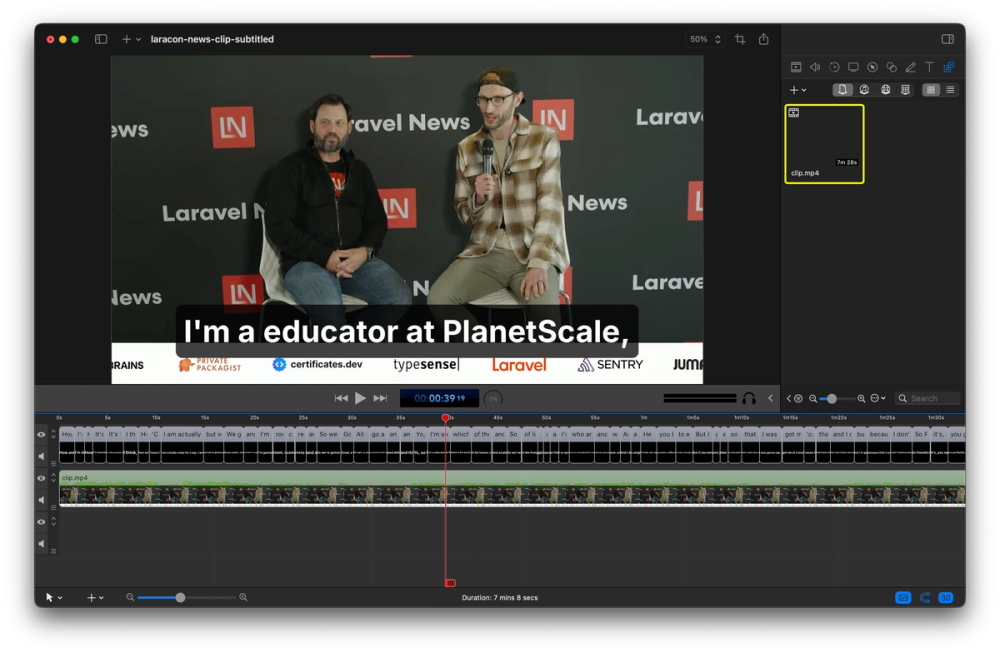
Saying “a educator” should probably disqualify you from the role.
The prompt was something like this:
I want to automate adding subtitles to a video. The.screenflowfile in this directory contains assets, metadata and a timeline from a video editing application. Inspect the tracks to find the text “hello” and “world” and consider how you might write new tracks of text to a new row in the timeline. The.aacfile is an audio export from the current state of the timeline, transcribe it locally into subtitles so you have the required timings, and then add it.
I had created a new short video with some example text pieces so it could at least review the existing state to deconstruct the metadata and make a plan to write its own.
The agent took some time to figure out the file’s structure but quickly put together a working prototype. It’s a Python script that uses Whisper for local transcription, which is written to a .vtt file for subtitles with timings, then it creates each text chunk manually in the ScreenFlow file.
There were some file format complications that I can’t begin to understand. At first, I couldn’t even open the file without crashing the app. Later, if I made edits to the file it wrote to, I couldn’t make changes and save them. The structures it was creating weren’t in the shape the application was expecting. But one by one, it solved these issues, we made some design tweaks, and now, it just works.
In an ideal world, ScreenFlow would have a way to be extended so that this function could be run from within the application. And I’ll likely extend the Python script to generate its own audio file from the current state of the timeline. But I’m very happy with how it works, because the alternatives are too complicated or needlessly expensive.
Since I didn’t really build this and can’t read Python, here’s my agents’ explanation of what we built
We built a Python script that automatically transcribes audio and injects timed subtitle text clips directly into ScreenFlow documents — no manual subtitle work required. You point it at an audio file and a .screenflow project, and it runs the audio through whisper-cpp for transcription, parses the resulting VTT file, intelligently re-chunks the subtitles to fit a character limit (using dynamic programming to find balanced, natural-reading line breaks at sentence and clause boundaries), and then writes the subtitle clips into a copy of the ScreenFlow document as native TextClip entities on a new track. The whole thing runs on Python's standard library with no pip dependencies — just whisper-cpp and ffmpeg via Homebrew.
The hard part was the ScreenFlow document format itself. A .screenflow file is a macOS bundle containing a Core Data binary store — not SQLite, not XML, but a custom binary format with a 64-byte header, an NSKeyedArchiver-encoded object graph, and metadata. We had to reverse-engineer the structure by inspecting existing documents: figuring out that all times are stored in units of 1/3000th of a second, that clip timings must be quantized to frame boundaries (derived from the source media's framerate metadata) or ScreenFlow silently refuses to save, that null values must be proper NSNull instances rather than the $null sentinel, that TextClip and MediaSource entities require bidirectional Core Data relationships or the app crashes with EXC_BAD_ACCESS, and that NSFont name fields must be UID references rather than raw strings. Perhaps the most painful lesson was discovering that naively creating duplicate helper objects (nulls, colors, fonts) for each of the 137 subtitle clips bloated the object graph from ~3,600 to ~27,600 entries and triggered an internal validation error on save — the fix was building a shared object pool that pre-creates every reusable object once and references it by UID across all clips.
While amazing, this leaves me wondering if the development of genuinely useful features is this simple; why aren’t all our applications getting markedly better every day? Especially those that have existed for a long time, and so are likely to have a solid foundation to build upon. It shouldn’t be up to me to essentially “hack” features into ScreenFlow; the app developers themselves could’ve shipped this already.
We’re in a bizarre two-speed future where impatient developers don’t have to wait, and everyone else looks like they’re dragging their heels. I wish all this AI tooling were delivering us better apps, but currently, it seems we’re settling for more apps.
It’s cool, we can do anything. But I don’t always want to do everything.
